PS5 Pro Disc Drive: Complete Guide to Sony’s Latest Upgrade
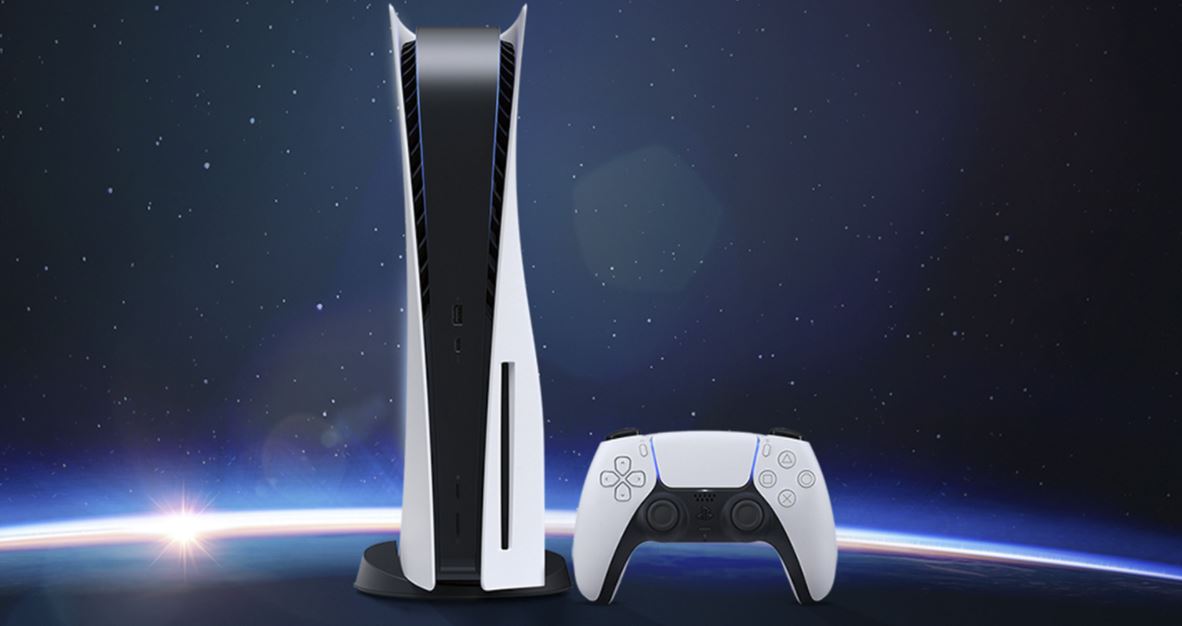
The PS5 Pro is finally making headlines, and one of the most talked-about features is its disc drive. While Sony’s focus on digital gaming continues to grow, many players still prefer owning physical copies of their favorite titles. Whether it’s for collecting, sharing, or avoiding massive downloads, the PS5 Pro disc drive keeps that traditional option alive.
In this detailed guide, we’ll explore everything you need to know about the PS5 Pro disc drive—from its design and performance to compatibility, installation, and troubleshooting. Let’s dive in.
What Is the PS5 Pro Disc Drive?
The PS5 Pro disc drive is an external, detachable optical drive designed to read Blu-ray discs, physical PS5 and PS4 game discs, and 4K Ultra HD movies. Unlike the original PS5, which came in two separate models (Disc and Digital Editions), the PS5 Pro is expected to feature a modular design—allowing users to add or remove the disc drive as they wish.
This modular approach provides flexibility. Players who buy the digital-only version can later purchase and attach the PS5 Pro disc drive if they change their mind. It’s a smart move by Sony to accommodate both digital and physical gamers.
Key Features of the PS5 Pro Disc Drive
Here are the standout features of Sony’s next-generation disc drive:
Detachable and Modular Design
The most noticeable upgrade is the removable drive. You can attach or detach it easily without needing a technician. It connects seamlessly to the console’s side panel, maintaining the sleek PS5 Pro design.
4K Ultra HD Blu-ray Support
The drive supports 4K UHD Blu-ray playback, offering cinematic-quality visuals and sound. Whether you’re watching blockbuster movies or revisiting classics, the experience is crisp, clear, and immersive.
Backward Compatibility
The PS5 Pro disc drive is compatible with PS5 and PS4 physical discs. This means you can replay your old favorites on the new console with improved graphics and performance boosts.
Silent Operation
Sony has focused on noise reduction. The new drive operates quietly, eliminating the loud spinning sounds that sometimes occurred with the standard PS5 disc version.
High-Speed Data Reading
The drive ensures faster game installations and loading times. It utilizes improved data transfer rates, matching the PS5 Pro’s upgraded internal architecture.
PS5 Pro Disc Drive vs Standard PS5 Disc Drive
| Feature | PS5 Disc Drive | PS5 Pro Disc Drive |
|---|---|---|
| Design | Built-in (fixed) | Detachable and modular |
| Performance | Standard Blu-ray speed | Enhanced read/write speed |
| Noise | Moderate | Quieter operation |
| Compatibility | PS4 & PS5 discs | PS4 & PS5 discs |
| 4K Movie Support | Yes | Yes (improved HDR support) |
The clearly offers better flexibility and improved performance, catering to gamers who prefer customization and convenience.
Why Sony Chose a Detachable Disc Drive
Sony’s move toward a modular disc drive aligns with the broader trend in tech—flexibility and sustainability. Here’s why this decision makes sense:
Lower Manufacturing Costs:
Sony can produce one main PS5 Pro model and offer the disc drive separately, reducing complexity and cost.
Consumer Choice:
Players can choose whether they want a digital-only or physical setup without being locked into one version.
Repair and Replacement Ease:
If the disc drive malfunctions, you can simply replace it instead of sending the entire console for repair.
Future-Proofing:
As the industry shifts toward digital gaming, the detachable drive ensures players can adapt over time without buying a new console.
Installing the PS5 Pro Disc Drive
Attaching the PS5 Pro disc drive is designed to be quick and user-friendly. Here’s how it works:
Power Off the Console:
Always switch off your PS5 Pro and unplug it before starting the installation.
Remove the Side Panel:
Gently slide off the right side cover where the disc drive will attach.
Align the Connector:
The disc drive connects through a dedicated port on the console. Align it carefully until it clicks into place.
Secure with Screws (If Provided):
Some versions may include a small latch or screw to hold it firmly.
Power On and Update Firmware:
After attaching, power on your console. The PS5 Pro should automatically detect the drive and install any necessary firmware updates.
Test with a Game Disc or Movie:
Insert a disc to confirm it’s working properly. You’re all set!
Common Issues and Troubleshooting Tips
Even though the is designed for reliability, issues can occasionally occur. Here’s how to handle them:
Drive Not Recognized
Ensure the disc drive is properly connected.
Check for system updates.
Reboot the console after reconnecting the drive.
Disc Not Reading
Clean the disc with a soft microfiber cloth.
Try another disc to check if the issue is with the drive or the disc itself.
Eject Button Not Responding
Use the manual eject option from the PS5 system settings.
Restart your console and test again.
Loud Spinning Noise
Ensure the console is placed on a flat, vibration-free surface.
Clean the air vents to improve cooling.
PS5 Pro Disc Drive Compatibility and Region Information
Sony typically locks physical discs to specific Blu-ray regions, but games are region-free. That means:
Games: You can play discs from any region worldwide.
Movies: Blu-ray movies follow regional coding.
Accessories: Theworks globally, as long as firmware updates are supported in your region.
So if you buy your PS5 Pro in one country and the in another, compatibility shouldn’t be an issue.
Digital vs Physical Games on the PS5 Pro
With both digital and physical options available, which should you choose? Let’s compare the pros and cons.
Physical (Disc) Games
Pros:
Can be resold or shared.
Don’t require massive downloads.
Collector-friendly for physical copies.
Cons:
Requires storage space.
Risk of disc damage or loss.
Slightly slower installation (initially).
Digital Games
Pros:
Instant access—no disc swapping.
Easier to store and manage.
Frequent discounts on PlayStation Store.
Cons:
No resale or sharing options.
Heavier storage demand.
Full reliance on Sony’s servers.
The PS5 Pro disc drive gives you the best of both worlds—digital convenience with the option for physical ownership.
Future of Disc Drives in Gaming
Many experts predict that gaming is heading toward an all-digital future, yet disc drives remain important for millions of users. Here’s why:
Internet Limitations:
Not everyone has access to fast or unlimited internet for huge downloads.
Collectors and Resellers:
Many players enjoy owning physical copies or trading them later.
Preservation:
Discs help preserve classic games that might vanish from digital stores over time.
So even as cloud and digital gaming evolve, the ensures that physical media continues to have a place.
PS5 Pro Disc Drive Price and Availability
Sony hasn’t officially confirmed final pricing yet, but industry reports suggest the will retail separately for around $79–$99 USD. This makes it an affordable add-on for those purchasing the digital version of the console.
The drive will likely be sold:
As part of bundles with the PS5 Pro console.
Separately through official PlayStation stores and retailers.
Possibly in limited edition designs matching special console versions.
Maintenance Tips for Long-Term Use
To keep your performing optimally:
Avoid Scratched Discs: Always handle discs by the edges.
Keep the Console Ventilated: Prevent overheating which can affect drive performance.
Clean Regularly: Dust can block the disc slot; use compressed air gently.
Eject Before Moving: Never move the console while a disc is inserted.
Use Original Power Cables: Voltage inconsistencies can cause reading errors.
Proper care ensures smooth operation for years to come.
The Bottom Line: Is the PS5 Pro Disc Drive Worth It?
Absolutely—if you value flexibility, collection, and physical ownership. The bridges the gap between modern digital gaming and traditional physical media. It’s ideal for:
Gamers upgrading from older consoles.
Those with large PS4 disc libraries.
Players who enjoy watching Blu-ray movies in 4K.
Collectors who love tangible game copies.
In short, the PS5 Pro’s modular disc drive design is Sony’s smartest and most consumer-friendly decision yet.
Final Thoughts
The PS5 Pro disc drive perfectly represents balance—offering the freedom of digital gaming with the reassurance of physical media. Its detachable design, improved performance, and quiet operation make it a valuable upgrade for any PlayStation fan.
Whether you’re a collector, movie lover, or casual gamer, having the option to attach or remove your disc drive adds real versatility. As Sony continues to innovate, this feature sets a new standard for console flexibility and player choice.
So, when the PS5 Pro launches, the disc drive isn’t just an accessory—it’s a smart investment for anyone who wants the best of both gaming worlds.













Post Comment